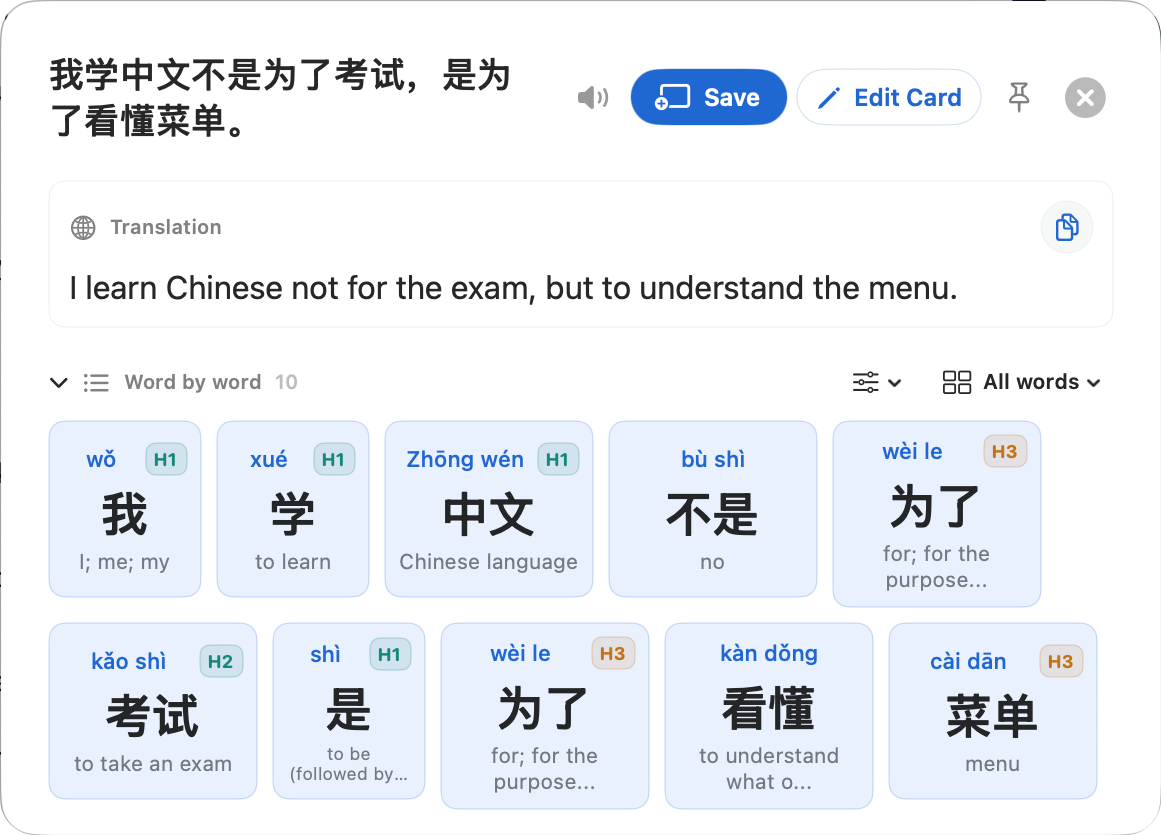
Look up selected Chinese in supported Mac apps, or use Snip and Hover Lookup for text in images. Get pinyin, definitions, translation, HSK context, and a word-by-word breakdown—then review locally or send to Anki.Select Chinese in a Mac app—or capture it from an image. Get pinyin, translation, and word-by-word context, then keep what matters.
See each selection, click, and result in the full walkthrough, or choose a short demo of word lookup, Anki, or Snip to Translate.
Product tourFull walkthrough
From reading to remembering.
Follow a word lookup, select a sentence, preview and save a flashcard, then review it in Zhenzhu.
The complete reading loop
From first glance to the next review.
Zhenzhu is built around the whole moment: how you notice Chinese, how you inspect it, and what you choose to remember.
01
Capture Chinese anywhere
Select it, snip it, hover it, or search it.
Use the interaction that fits the page in front of you. Zhenzhu can follow a text selection, capture pixels, inspect the word under your pointer, or work as a full dictionary.
Automatic lookup and selection button
Configurable global shortcuts
Image, PDF, interface, and paused-video OCR
Type, paste, or drop an image into Dictionary & Translate
02
Understand it your way
A translation is the beginning, not the answer.
Start with the natural sentence, then inspect the language beneath it without losing the context that made the word useful.
Pinyin, definitions, speech, and HSK context
Word-by-word sentence breakdown
Simplified and traditional display
Merge, split, replace, or keep a custom phrase
03
Remember without lock-in
Keep the words that earned your attention.
Zhenzhu remembers locally. Review with its built-in FSRS scheduler, organize your own decks, export your cards, or continue in Anki.
Searchable lookup history
Local flashcards and direction-aware review
Decks, import, export, and bulk management
Optional Anki cards with context, image, and audio
Built-in memory, optional Anki
Save the word—not the busywork.
One click carries the useful context forward. Study inside Zhenzhu or preview exactly what will be sent to Anki.
Local flashcardsFSRS review, decks, search, import, and export.
Anki when you want itContext-rich cards with optional image and audio.
FlashcardsLocal on this Mac
Ready when you areFSRS keeps each memory at the right distance.
Due12
New7
Recall91%
菜Words from reading18 cards · 6 dueReview →
One-time purchase, no subscription
Reading is free. Learning grows with Pro.
Start with the complete reading tool, free for as long as you like. Upgrade only when you want more scale, organization, and learning automation.
Free
Understand anything you read.
$0 forever
Unlimited dictionary lookups, sentence translation, and speech
Selection lookup, pop button, and configurable global shortcut
Word breakdown, HSK context, and segmentation correction
15 new mined cards and 20 OCR reads each month, in Zhenzhu or Anki
Unlimited reviews, the latest 30 history entries, and card export
Free: A complete Chinese reading tool. ·Pro: More scale, organization, and learning automation.
Windows and more languages
What should Zhenzhu support next?
Zhenzhu 1.1 for macOS is available today. Join the waitlist for Windows or tell us which language you would like us to add next.
macOS 15+Zhenzhu 1.1 · Available now
WindowsRelease validation · Beta waitlist
Private by construction
Your reading stays yours.
Dictionary lookups, history, vocabulary status, and flashcards live on your Mac. Optional crash reports and anonymous product analytics have separate controls and stay off until you explicitly opt in.
Zhenzhu is a native Chinese reading companion for macOS. It explains selected, captured, hovered, pasted, or typed Chinese with pinyin, definitions, sentence translation, HSK context, speech, and word breakdowns.
Which versions of macOS are supported?
Zhenzhu requires macOS 15 or later. It runs quietly from the menu bar without adding a permanent Dock icon.
Where can I use Zhenzhu?
Use it anywhere macOS can expose a text selection. When text is rendered as pixels, Snip to Translate and Hover Lookup can recognize Chinese from images, PDFs, paused video, and application interfaces.
Why does Zhenzhu request Accessibility permission?
Accessibility permission lets Zhenzhu read only the text you intentionally select in another app and position the lookup beside it. Clipboard fallback is optional and can be disabled in Settings.
Why is Screen Recording permission needed?
macOS requires Screen Recording permission for pixel-based features such as Snip to Translate and Hover Lookup. Zhenzhu uses captured pixels for the lookup you request; your learning data remains local.
Does Zhenzhu work without Anki?
Yes. Zhenzhu includes its own local flashcard library, decks, FSRS scheduling, study sessions, import, and export. Anki is an optional local integration.
Does it work offline?
The dictionary, on-device OCR, history, and local flashcards work on your Mac. Translation and speech depend on macOS language support and may require an initial download. Purchases, first license activation, and software updates need an internet connection.
What can I do with Zhenzhu Free?
Free includes every way to look up Chinese, unlimited dictionary and sentence translation, word breakdown, segmentation correction, pinyin, definitions, HSK context, and speech. It also includes unlimited reviews, recent history, one deck, card export, and 15 new mined cards and 20 OCR reads each month. Free has no time limit and needs no account.
Is Pro a subscription?
No. Zhenzhu Pro is a one-time purchase of US$29 that includes all future updates, with no subscription. Early supporter price: $9 for the first 10 buyers — 10 spots left (regular price $29).
How do I buy and activate Pro?
Choose Buy Zhenzhu Pro here or in the app and complete checkout with Lemon Squeezy. Use the activation link or license key from your purchase to activate in Zhenzhu. Each license covers 3 Macs. Keep your license key private.
Zhenzhu 1.1 · Native for macOS 15+
Keep reading. Understand more.
Start with unlimited dictionary lookup, sentence translation, and speech. Free also includes 15 mined cards and 20 OCR reads a month, with no time limit.