
If you spend hours reading Chinese every week, your choice of dictionary tool directly dictates whether you achieve deep immersion or get bogged down in tedious copy-pasting.
For over a decade, browser extensions like Zhongwen and Inkah have been the gold standard for reading Chinese web pages. But today, serious language learners do not just read ordinary web pages. We read native PDFs, Kindle books, scanned comics (manhua), game dialogues, subtitles in video players, and messages on WeChat and Discord.
Once you step outside Google Chrome, browser extensions stop working. Let's compare the three main approaches to reading Chinese on macOS: browser extensions, mobile dictionary ports (Pleco), and native system companions like Zhenzhu.
The Desktop Reading Dilemma
When you encounter an unfamiliar character or sentence in Chinese, your brain has a strict "interruption budget." If looking up a word takes more than 2 to 3 seconds—switching windows, launching an app, taking a screenshot, opening Google Translate, and copy-pasting—you lose the context of the sentence and the narrative momentum is broken.
An ideal Chinese reading tool on desktop must satisfy four criteria:
- Ubiquitous availability: It must work in any application (Kindle, Apple Books, Safari, PDF readers, Notion, video players).
- Non-disruptive UX: It should appear right beside the text and disappear the moment you keep reading.
- Deep linguistic breakdown: It shouldn't just give a raw machine translation; it must show character decomposition, pinyin with tone marks, HSK levels, and word segmentation.
- Frictionless flashcard capture: If a word is worth remembering, you should be able to save it to your SRS deck (or Anki) in one click without leaving the page.
Quick Comparison Matrix
| Feature | Zhongwen / Inkah | Pleco (iPad / Sideload) | Zhenzhu (macOS Native) |
|---|---|---|---|
| Where it works | Chrome & Firefox tabs only | Separate standalone window | Entire macOS system |
| Trigger Method | Mouse hover on webpage | Manual search / clipboard paste | Text selection, global shortcut, or hover |
| OCR (Images & PDFs) | ❌ No | ⚠️ Camera / static image import | ✅ Snip-to-translate & screen OCR |
| Sentence Breakdown | Word by word hover | Char by char search | Full sentence grammar & word segmentation |
| Audio / Speech | Basic TTS | Native human & high-quality TTS | macOS high-fidelity system voices |
| Anki / SRS Export | Text export / AnkiConnect plugin | Pleco flashcard database | Built-in FSRS scheduler + 1-click Anki export |
| Pricing | Free | Free base / $30–$100 add-ons | Free tier / One-time purchase ($29) |
1. Browser Extensions: Zhongwen & Inkah
Best for: Casual reading of news articles, Wikipedia, and blogs directly inside Chrome or Firefox.
Pros:
- Completely free and open-source.
- Instant hover popup over DOM text elements.
- Supports stroke animations, tone colors, and word lookup.
Cons:
- Confined to browser tabs: If you read an ebook in Apple Books, a scanned novel in Preview, or subtitles in IINA / VLC, Zhongwen cannot see it.
- Fails on protected or canvas text: Web novel sites (like Jinjiang / JJWXC) frequently use image-rendered characters or canvas text to prevent copy-pasting, rendering DOM extensions useless.
- Fragmented sentence context: Extensions inspect individual words as you hover, but do not provide whole-sentence grammatical context or AI-assisted nuance for complex sentences.
2. Pleco on macOS (Apple Silicon iPad App)
Best for: Deep lexical research, etymology, and authoritative professional dictionaries (Grand Ricci, ABC, Outlier Linguistics).
For the current status of a Mac version and every way to run Pleco on a Mac today, see Pleco for Mac: is there a Mac app, and what to use until then.
For mobile users, Pleco is universally revered as the undisputed king of Chinese dictionaries. On Apple Silicon Macs (M1/M2/M3/M4), you can download the iPad version of Pleco from the Mac App Store.
Pros:
- Unmatched dictionary depth: Outlier character breakdowns, classical Chinese dictionaries, and historical etymology.
- Robust internal flashcard system with custom algorithms.
- Complete offline reliability.
Cons:
- Not built for macOS ergonomics: As an iPad port, it runs in a rigid iPad-proportioned window and lacks native macOS menu bar integration.
- High context switching: You have to copy text from your book, switch focus to Pleco, paste it, search, and switch back. Doing this 50 times during an hour of reading causes severe cognitive fatigue.
- No background screen OCR or automatic selection lookup popups.
3. Zhenzhu: Native macOS Reading Companion
Best for: Frictionless, distraction-free reading across books, PDFs, native apps, and web novels on Mac.
Zhenzhu was engineered from the ground up as a native macOS utility. It lives discreetly in your menu bar and stays completely out of your way until you need it.
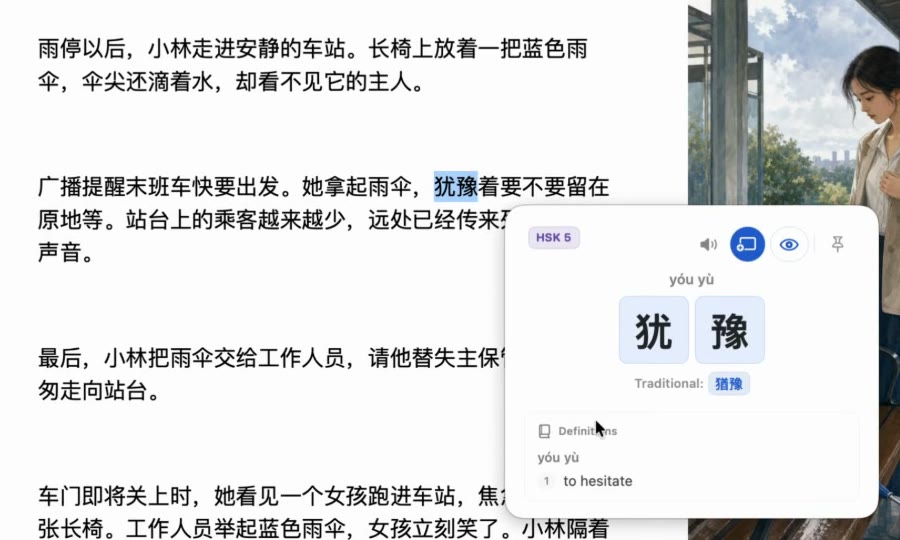
What makes Zhenzhu unique:
- Works Across Every Mac App: Highlight Chinese in Apple Books, Kindle for Mac, PDFs in Preview, Slack, or any web browser.
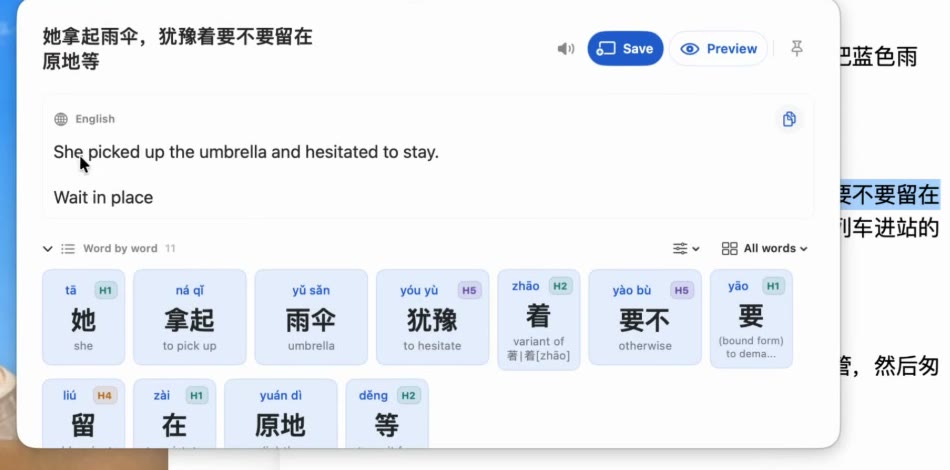
- Snip to Translate (Screen OCR): Encounter an image-locked chapter on a web novel site, a scanned comic, or non-selectable subtitle? Draw a box over it with
Snip to Translateto recognize characters instantly on-device. - Word Segmentation & Full Sentence Translation: Unlike raw dictionaries that require you to guess word boundaries, Zhenzhu automatically segments the sentence into logical words, shows the HSK level of each component, and provides natural sentence translation.
- Built-in FSRS Flashcards & Local Anki Export: Keep words in Zhenzhu's local deck powered by the state-of-the-art FSRS spaced repetition algorithm, or export directly to your local Anki collection with sentence context and audio in one click.
- 100% Privacy by Design: Your lookups, reading history, and flashcards stay strictly local on your Mac.
Which Tool Fits Your Workflow?
Rather than choosing just one, many successful Chinese readers combine them:
- Use Zhongwen / Inkah if 100% of your reading happens on standard text-based web pages in Chrome.
- Keep Pleco as your deep reference library on your phone or tablet when you need to research character etymology or ancient roots.
- Use Zhenzhu on your Mac as your daily driver reading companion whenever you read books, PDFs, web novels, or desktop content where maintaining flow and fast Anki card creation is critical.
Read Chinese on your Mac without friction
Selection lookup, on-device OCR, pinyin tone marks, HSK context, and 1-click Anki export. Try Zhenzhu Free today on macOS 15+.