
To learn Chinese with C-dramas on a Mac, pick modern slice-of-life shows at your level, match your lookup tool to how the platform delivers its subtitles, and study one short scene at a time instead of whole episodes. A 20-minute routine of watching, mining three to five sentences, and reviewing them turns a show you enjoy into active listening practice.
Why watching C-dramas with English subtitles stops working
Many learners start a Chinese TV series (电视剧, diàn shì jù: TV series / TV drama, HSK 3.0 Level 4) with English subtitles turned on, hoping Mandarin will rub off through exposure. Three episodes in, they notice they can follow the plot but cannot catch a single full sentence by ear. That is not a lack of talent. It is what the setup trains.
Passive watching with English subtitles trains your English reading speed. Your eyes track the bottom line, your brain assembles the story in English, and the Mandarin audio fades into background music. You can watch fifty hours this way and still freeze when someone asks a simple question at natural speed.
Switching cold to raw Chinese subtitles creates the opposite problem. Without a fast lookup workflow, you pause every ten seconds, copy characters into a separate dictionary window, lose the emotional thread of the scene, and quit out of frustration before the opening episode ends. Raw Chinese subtitles only work when looking up an unknown word takes two or three seconds.
Then there is the dual-subtitle trap. When English and Chinese appear on screen at the same time, your eyes jump to the English line first almost automatically. By the time you glance at the Chinese characters, you already know what the character meant, so your brain never has to decode the Mandarin structure.
C-drama platforms on Mac: soft subs, hardsubs, and DRM capture compared
Before you choose a browser extension or dictionary app, check how your streaming platform delivers its Chinese subtitles (字幕, zì mù: subtitles / captions, HSK 6). A hardsub is burned directly into the video frames as pixels. A soft sub is a separate text track that the browser renders over the video. That single distinction decides which tools work on your Mac.
Mainland Chinese streaming platforms (iQIYI, Youku, WeTV, MangoTV, and Bilibili) almost always burn Chinese subtitles directly into the video stream so the font matches the show's art direction, while serving translated languages like English or Spanish as soft subtitle tracks. Their official YouTube channels upload full 1080p episodes from the same masters: the Chinese characters are baked into the video pixels, while YouTube's CC menu usually carries only English or auto-translated tracks.
Rakuten Viki works differently. Its community volunteers transcribe and translate shows into soft subtitle tracks, and supported Chinese dramas include a built-in "Learn Mode" with clickable dual subtitles (see the Viki Help Center for supported titles).
| Platform | Chinese subtitle format | macOS screen capture | Browser dual-sub extensions (Language Reactor / asbplayer) | Desktop OCR & popup lookup (Zhenzhu, our app) |
|---|---|---|---|---|
| YouTube (official iQIYI / Youku / WeTV / Huace channels) | Burned-in Chinese hardsubs on most shows; soft CC is usually English only | Clean video frame | Only on uploads that include a separate soft Chinese CC track | Yes (reads burned-in subtitles via on-device OCR) |
| Rakuten Viki | Selectable soft subtitles + Learn Mode on supported shows | Clean video frame in standard browser playback | Yes (built-in Learn Mode or DOM-based extensions) | Works via text selection or OCR, though soft text is already clickable |
| iQIYI web | Burned-in Chinese hardsubs; soft tracks for English and other languages | Clean video frame on non-DRM streams | Only if a soft Chinese track is provided alongside the video | Yes (Snip to Translate and clip recording read burned-in subs) |
| WeTV & Youku web | Burned-in Chinese hardsubs | Clean video frame on non-DRM streams | No on burned-in Chinese lines (pixels are invisible to DOM extensions) | Yes (reads burned-in subtitles directly from the frame) |
| Bilibili | Burned-in Chinese hardsubs on dramas and vlogs; optional soft AI captions on some videos | Clean video frame | Only when the uploader attaches a soft CC track | Yes (captures burned-in subs and on-screen text) |
| Netflix | Selectable soft Chinese (Simplified & Traditional) subtitle tracks | DRM black screen (FairPlay / Widevine) | Yes (reads the soft subtitle text directly from the page DOM) | No for screen OCR (macOS capture sees a black video frame) |
The practical takeaway is simple: burned-in text is pixels. Browser popup dictionaries and dual-subtitle extensions cannot hover over or click on burned-in Chinese characters unless the platform also provides a separate soft Chinese subtitle track. That is why an extension that works well on Netflix often does nothing on a YouTube or iQIYI C-drama upload.
For a deep dive into extracting and studying burned-in subtitles, read our guide on how to make Anki cards from hardcoded Chinese subtitles.
Choosing the right shows by level (and why to skip costume dramas at first)
Genre matters far more than a show's rating. A chart-topping drama will do very little for your everyday speaking if the characters talk like Tang dynasty generals or immortal gods. Match the genre to the Chinese you actually want to speak.
Start with modern urban dramas
Modern slice-of-life dramas (现代, xiàn dài: modern times / modern era, HSK 3.0 Level 5) use contemporary everyday Mandarin. Characters order food, rent apartments, text friends, apologize after misunderstandings, and talk through workplace problems. Whether the show uses live location sound or standard studio dubbing, the pronunciation is clear and the sentences transfer directly into real conversations.
Save period and fantasy dramas for later
Period costume dramas (古装, gǔ zhuāng: ancient costume / period costume) and fantasy genres (wuxia and xianxia) lean heavily on classical pronouns, imperial titles, four-character literary idioms, and poetic phrasing. Nobody talks that way in a modern office or coffee shop. If you love costume dramas, watch them with English subtitles to relax, and keep your active 20-minute study sessions on modern shows until you reach an upper-intermediate level.
What to look for at your level
- HSK 2–3 (high beginner to early intermediate): Choose modern family dramas, youth campus stories, or short-episode web series where conversations revolve around daily routines, school, meals, and family relationships. Two-person dialogue scenes in quiet settings are much easier to parse than crowded group scenes.
- HSK 4–5 (intermediate): Step up to modern workplace dramas, legal or medical slice-of-life series, and mystery thrillers. At this stage, faster banter, emotional arguments, and idiomatic reactions give you the exact connectors and modal particles that textbooks leave out.
The 20-minute "Watch, Mine, Review" routine
Trying to study every unknown word in a 45-minute episode turns a show you love into a three-hour chore. Instead, watch the episode normally for enjoyment, and run a tight 20-minute study block on a single three-minute dialogue scene.
- Minutes 0–5 (Watch for context): Pick one two- to three-minute scene with clear back-and-forth dialogue. Watch it straight through once without pausing so you know who is upset, who is joking, and what the scene is about.
- Minutes 5–15 (Mine 3 to 5 sentences): Replay the scene and pause only on i+1 lines—sentences where you understand every word except one useful conversational word or phrase. Look up that target word, listen to how the actor places the stress, and save the complete sentence as a flashcard.
- Minutes 15–20 (Review and shadow): Review your due flashcards for the day and repeat today's new drama lines out loud, copying the actor's rhythm and tone contours.
Always save the full sentence rather than an isolated vocabulary word. A single word on a card gives you an abstract dictionary gloss; the full drama sentence preserves the grammar pattern, emotional register, and situation. If you are new to picking the right lines, see our guide to Chinese sentence mining with the i+1 method.
Worked example: mining a real C-drama dialogue line
Textbook dialogues are polite and tidy. Drama dialogues are full of defensive apologies, rhetorical questions, and emotional qualifiers. Suppose you pause on an argument scene where a character says:
我知道你还在生气,但我不是故意的。 (Wǒ zhī dào nǐ hái zài shēng qì, dàn wǒ bú shì gù yì de.) — "I know you're still angry, but I didn't do it on purpose."
Two core words carry the meaning of this line:
- 生气 (shēng qì): to get angry; to be furious (HSK 3).
- 故意 (gù yì): deliberately; on purpose (HSK 4).
If you already know 生气 and the basic connectors, 故意 is your single unknown target word (i+1). Here is how that line looks as a sentence flashcard:
我知道你还在生气,但我不是故意的。
(drama audio or frame on the front)
故意 (gù yì): deliberately; on purpose (HSK 4)
"I know you're still angry, but I didn't do it on purpose."
Compare that with a sentence that has too many unknowns at once, or a line filled with specialized terminology. If you have to look up three words just to guess what the sentence means, skip it and wait for a cleaner line thirty seconds later.
High-frequency C-drama reaction words worth mining
Once you start watching modern dramas with Chinese subtitles, you will hear the same ten conversational words in almost every episode:
| Word | Pinyin | Meaning | HSK 3.0 Level |
|---|---|---|---|
| 放心 | fàng xīn | to feel relieved; to be at ease | HSK 3 |
| 习惯 | xí guàn | habit; to be used to | HSK 3 |
| 差不多 | chà bu duō | almost; nearly; more or less | HSK 3 |
| 误会 | wù huì | to misunderstand; misunderstanding | HSK 4 |
| 解释 | jiě shì | to explain; explanation | HSK 4 |
| 赶紧 | gǎn jǐn | hurriedly; without delay | HSK 4 |
| 到底 | dào dǐ | in the end; after all (in questions: "what on earth") | HSK 4 |
| 难道 | nán dào | don't tell me...; could it be that...? | HSK 4 |
| 开玩笑 | kāi wán xiào | to play a joke; to joke | HSK 4 |
| 顺便 | shùn biàn | conveniently; in passing | HSK 4 |
| 居然 | jū rán | unexpectedly; to one's surprise | HSK 5 |
| 犹豫 | yóu yù | to hesitate | HSK 5 |
| 难怪 | nán guài | (it's) no wonder (that...) | HSK 7–9 |
Instead of memorizing this table cold, listen for one or two of these words during your next episode and mine the exact scene where a character says them.
Setting up your Mac: when to use Language Reactor vs. Zhenzhu
Your Mac setup depends on whether the show's Chinese subtitles are selectable text or burned-in video pixels.
When subtitles are selectable soft text (Netflix and Viki)
When a platform serves selectable Chinese text—such as Netflix, Rakuten Viki's Learn Mode, or the occasional YouTube video with a manual zh-Hans CC track—browser extensions are the most direct tool. Language Reactor and Yomitan read the subtitle text straight from the web page DOM, let you hover over words for instant definitions, and work on DRM-protected Netflix streams where screen capture is blocked.
When subtitles are burned into the video (YouTube, iQIYI, WeTV, Youku, Bilibili)
On the platforms where most C-dramas actually live, the Chinese subtitles are baked into the video frames, so browser extensions have no text to hook into. We built Zhenzhu—our native macOS menu-bar popup dictionary and sentence-mining app—to make burned-in subtitles just as fast to look up and mine as selectable text.
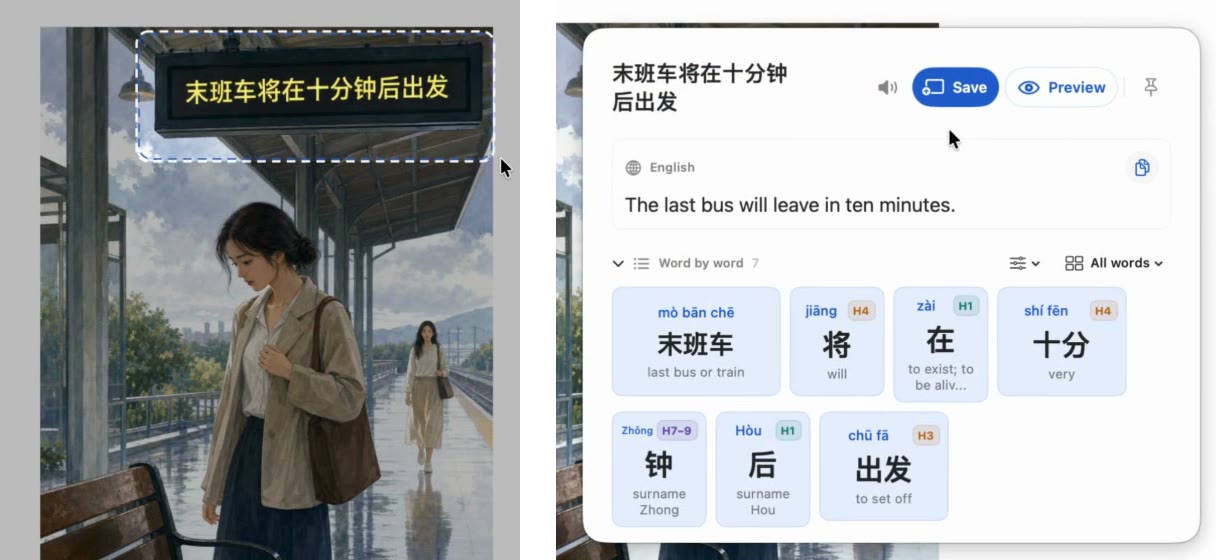
Here is how the C-drama workflow runs in Zhenzhu on macOS 15 or later:
- Capture a frame or a short clip: Press the global
Snip to Translateshortcut to freeze the screen and drag a box over the subtitle, or chooseRecord a clipto capture up to 15 seconds of video and system audio while OCR reads the subtitle lines across frames. - Inspect the word-by-word breakdown: Zhenzhu runs on-device OCR, translates the full sentence (using Apple's on-device translation session, including direct sessions on macOS 26 when language files are installed), and splits the Chinese line into clickable word chips showing tone-marked pinyin, CC-CEDICT definitions, and HSK levels. If a subtitle spans two lines, you can tick both lines to join them cleanly.
- Mine in one click: Click
Mineto save the sentence, target word, screenshot frame, and audio clip either to Zhenzhu's built-in FSRS flashcards or directly to Anki.
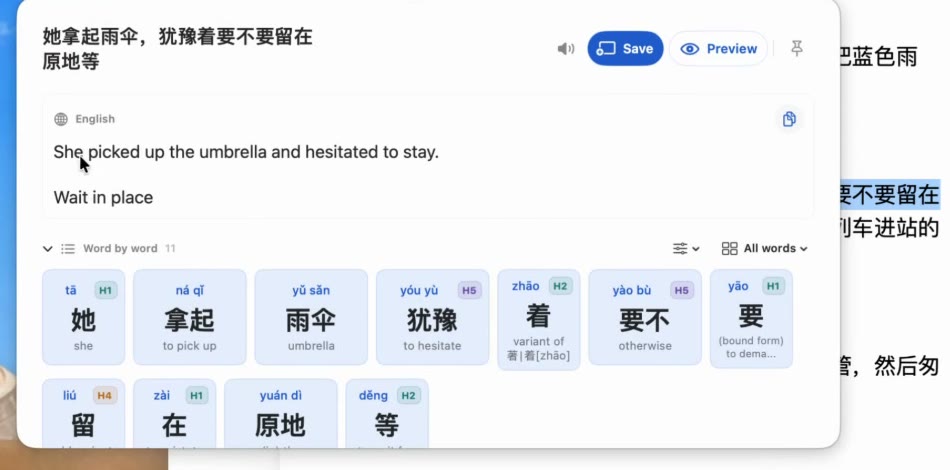
Zhenzhu's Free plan requires no account and has no time limit: lookups, sentence translations, speech, word-by-word breakdowns, and flashcard reviews are all unlimited, and you get 15 new mined cards per month (shared across Zhenzhu and Anki) plus 20 OCR reads per month. If you mine from dramas every day, Zhenzhu Pro is a $29 one-time purchase (with $9 and $19 early-supporter batches while available) for unlimited mined cards, unlimited OCR reads, multiple decks, and custom Anki note types across up to 3 Macs.
For a full side-by-side look at browser extensions, mobile dictionaries, and desktop tools, read our comparison of the best Chinese dictionaries and reading tools for Mac, or practice reading graded short fiction in our Chinese stories collection.
How this guide was made
Research and initial drafting were AI-assisted, then edited and fact-checked against official platform documentation and macOS 15 playback tests. All Chinese words, tone-marked pinyin, and HSK levels were verified against CC-CEDICT and the official HSK 3.0 word list, and Zhenzhu specifications were checked against release v1.1.1.
Read Chinese on your Mac without friction
Selection lookup, on-device OCR, pinyin tone marks, HSK context, and 1-click Anki export. Try Zhenzhu Free today on macOS 15+.