
Migaku is popular for a reason: it turns Chrome into a polished Japanese immersion setup for Netflix, YouTube, and web reading without forcing you to wire up five separate extensions. The catch is that it costs a recurring subscription and still lives primarily inside a browser.
If you study Japanese on a Mac and want either a one-time payment or a pop-up dictionary that works outside Chrome—in PDFs, Kindle, Preview, manga readers, and games—this guide compares the three practical paths: staying with Migaku, assembling the free Yomitan + ASBPlayer stack, or using a native macOS app like Zhenzhu.
Why Mac learners look for a Migaku alternative
Most learners who search for a Migaku alternative are not unhappy with immersion learning itself. They usually hit one of three friction points:
- Subscription fatigue: Learning Japanese to a comfortable reading level takes years, not months. Paying a monthly subscription on top of streaming services, books, and WaniKani or Bunpro adds up quickly.
- Reading outside Chrome: Once you start reading Japanese PDFs in Preview, ebooks in Apple Books or Kindle for Mac, manga volumes, or visual novels, a browser extension cannot reach those windows.
- Heavy browser setup: Running a full immersion suite inside Chrome can feel sluggish on older Macs, especially when you just want a fast, offline dictionary lookup and a clean sentence card.
Migaku vs. Yomitan + ASBPlayer vs. Zhenzhu
Here is how the three setups compare honestly on macOS:
| Feature | Migaku | Yomitan + ASBPlayer | Zhenzhu (macOS) |
|---|---|---|---|
| Pricing | Monthly / annual subscription (or high lifetime tier) | Free & open source | Free tier; $29 one-time Pro for 3 Macs |
| Where lookups work | Chrome browser + Migaku mobile app | Chrome & Firefox tabs only | System-wide across all Mac apps (browser, PDF, games, manga, video) |
| Streaming subtitle integration | Deepest (Netflix, YouTube, Disney+ dual subs, known-word tracking) | Strong with ASBPlayer + external subtitle files | On-screen OCR snip for any video or hardcoded subs |
| Offline Japanese dictionary | Cached in extension/app | Local after importing JMdict ZIPs | Built-in offline JMdict + deinflector out of the box |
| Image / manga / game OCR | Not built for desktop window OCR | Requires external tools (Mokuro, OwOCR, texthooker) | Built-in on-device Apple Vision OCR (horizontal & vertical) |
| Spaced repetition | Migaku Memory (synced mobile/web) or Anki | Anki via AnkiConnect | Built-in FSRS review + 1-click AnkiConnect export |
| Setup time | ~10 minutes | 30–60 minutes (ZIPs, AnkiConnect, templates) | Under 2 minutes |
Where Migaku is still the stronger pick
Be skeptical of any comparison that pretends one tool beats Migaku at everything. Migaku is still clearly better if your routine revolves around these features:
- Known-word color highlighting in Chrome: Migaku tracks every word you have marked known and visually highlights i+1 sentences on Netflix, YouTube, and Japanese web pages.
- First-class mobile sync: If you do most of your flashcard reviews on iOS or Android and do not want to touch Anki, Migaku Memory's mobile app is much smoother than setting up AnkiWeb + AnkiMobile.
- Multi-language switching beyond CJK: Migaku supports European languages (Spanish, French, German, etc.) in addition to Japanese, Chinese, and Korean. Zhenzhu is focused specifically on Chinese and Japanese on macOS.
Where a native Mac app wins
Once your Japanese immersion expands past Chrome tabs—or if you prefer owning a fast desktop tool outright—a native macOS app solves a different set of problems:
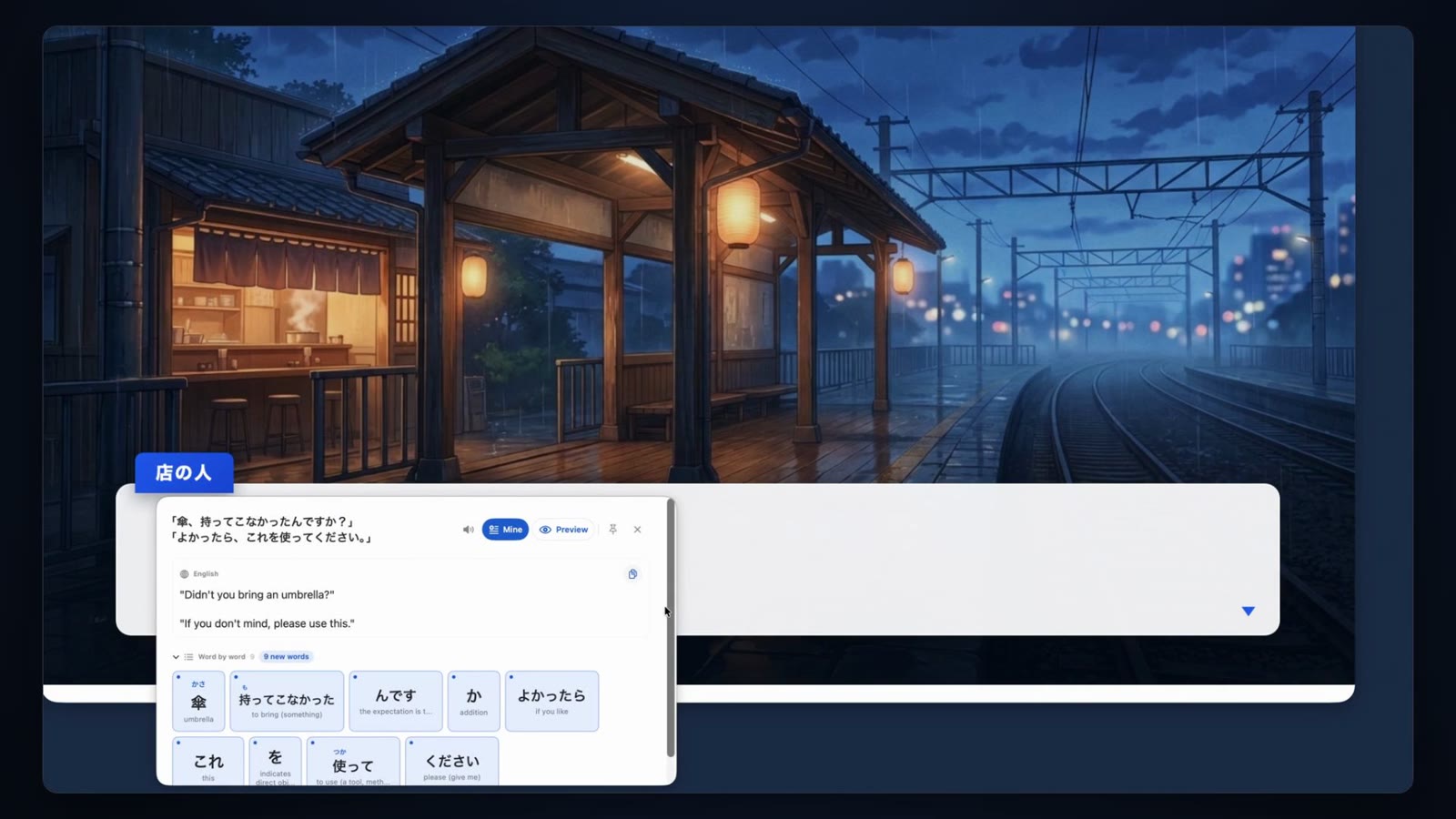
- One shortcut in every app: Look up Japanese in Safari, Chrome, Preview PDFs, Kindle for Mac, Obsidian, Discord, or Mail without switching windows or pasting text into Jisho.
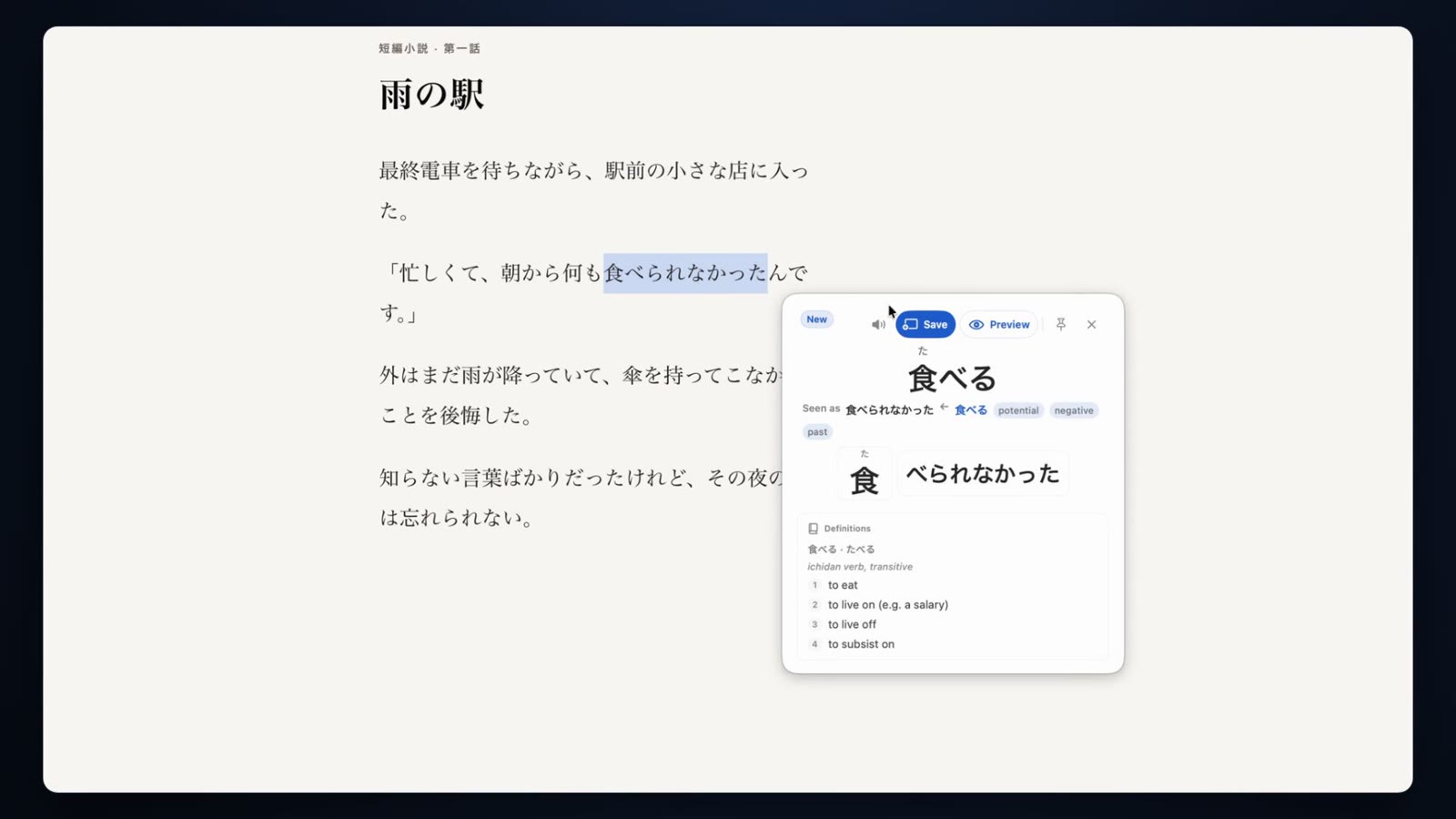
- Automatic verb and adjective deinflection: Hover or select a conjugated form like 食べられなかった and see the full chain back to the dictionary form 食べる (taberu), with furigana readings and JMdict definitions offline.
- On-device OCR for manga, games, and hardcoded subs: Press a hotkey to drag over a manga speech bubble or visual novel dialogue box. Apple Vision reads both horizontal and vertical (tategaki) Japanese locally on your Mac—no cloud API keys, no browser extensions, and no text-hooking scripts.
Subscription vs. one-time pricing over a year
Immersion is a multi-year habit, so pricing structure matters more than it looks on day one:
- Migaku: Standard subscription plans typically run around $10/month (or discounted annual plans), which means $120+ per year if you keep it active across two or three years of study.
- Yomitan + ASBPlayer: $0 forever, paid for in setup and maintenance time—especially if you also bolt on OCR tools for manga or games. See our full Yomitan alternative for Mac breakdown if you want to compare the free extension stack in detail.
- Zhenzhu: Free forever for unlimited offline Japanese dictionary lookups, deinflection, speech, and translation (plus 15 mined cards and 20 OCR reads per month). Pro is a single $29 one-time payment covering up to 3 Macs with unlimited OCR, unlimited local FSRS flashcards, and AnkiConnect export.
Which setup fits your daily immersion?
- Pick Migaku if your immersion is mostly Netflix/YouTube in Chrome, you love known-word color highlighting, and you want an all-in-one mobile SRS app.
- Pick Yomitan + ASBPlayer if you want $0 cost, stay inside Chrome/Firefox, and want deep customization with monolingual dictionaries and pitch-accent graphs.
- Pick Zhenzhu if you use macOS 15+, read across browsers, PDFs, manga, and games, want offline JMdict + Apple Vision OCR with zero setup, and prefer a one-time license over another subscription.
You can also pair them: keep Yomitan in Chrome for heavy web-novel sessions with monolingual dictionaries, and use Zhenzhu everywhere else on your Mac—or export mined cards straight into the same Anki deck using our Japanese sentence mining for Anki on Mac workflow.
How this guide was made
This comparison reflects macOS 15+ desktop workflows as of late 2026. Zhenzhu capabilities match the current macOS release (offline JMdict + Swift deinflector, Apple Vision on-device OCR, local FSRS flashcards, and AnkiConnect export; macOS only). Migaku and Yomitan feature sets reflect their public desktop browser extensions.
Read Chinese on your Mac without friction
Selection lookup, on-device OCR, pinyin tone marks, HSK context, and 1-click Anki export. Try Zhenzhu Free today on macOS 15+.