
If you learn Japanese through immersion, you already know Yomitan (the community successor to Yomichan). Inside Chrome or Firefox, nothing beats its custom dictionary ecosystem. The frustration starts the moment you leave the browser tab: a Japanese PDF in Preview, a visual novel, a scanned manga volume, Discord, or Safari.
This guide compares the real options for a Yomitan alternative on Mac—when to keep Yomitan, when 10ten works best, and when a native macOS menu bar app like Zhenzhu saves you hours of friction.
Where Yomitan stops
Yomitan is a browser extension. That architecture gives it deep DOM access inside Chromium and Firefox, which is why it excels on Syosetsu web novels, NHK News Web, and subtitle overlays like ASBPlayer. It also creates four hard boundaries on macOS:
- No system-wide lookup: Yomitan cannot see text in Preview, Apple Books, Kindle for Mac, Obsidian, Discord, Slack, or native macOS apps.
- No built-in OCR: If Japanese text is rendered as pixels—manga pages, Nintendo Switch capture streams, visual novels, or hardcoded anime subtitles—you have to bolt on separate tools like Mokuro, ShareX/OwOCR, or a texthooker.
- No Safari support: Yomitan targets Chromium and Firefox. Safari users on Mac usually turn to 10ten Japanese Reader instead.
- Setup overhead: A fresh Yomitan install ships empty. You have to download and import JMdict, pitch-accent, and frequency ZIP archives, configure AnkiConnect fields, and maintain Handlebars templates.
Yomitan vs. 10ten vs. Zhenzhu on Mac
Here is how the three most practical Japanese pop-up dictionaries on macOS compare side by side:
| Capability | Yomitan | 10ten Japanese Reader | Zhenzhu (macOS) |
|---|---|---|---|
| Where it works | Chrome & Firefox tabs only | Safari, Chrome, Firefox | Every Mac app (browser, PDF, games, manga, video) |
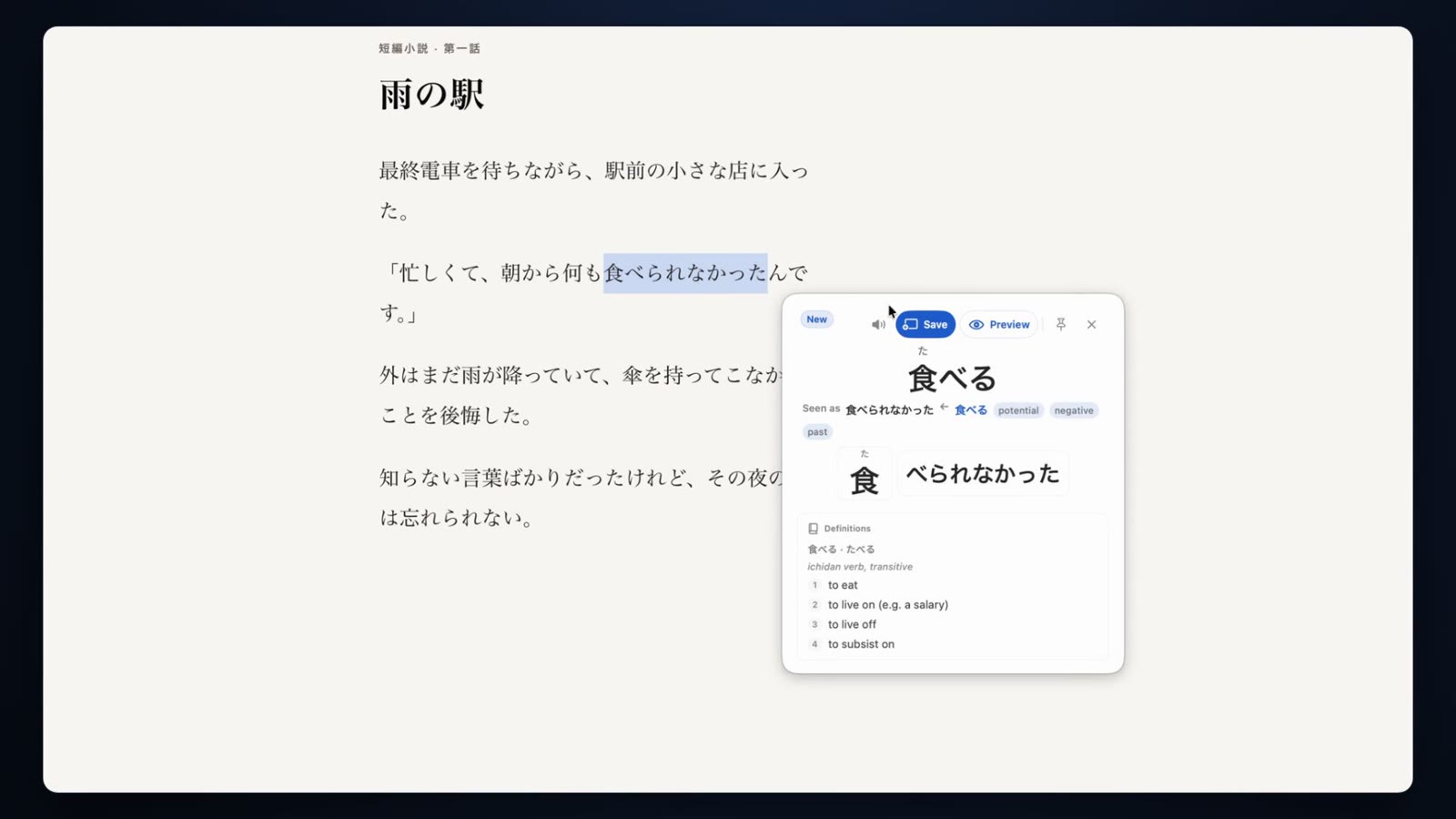
| Verb & adjective deinflection | Yes | Yes | Yes (shows full chain, e.g. potential + negative + past) |
| Pixel OCR (manga, games, images) | No (needs external OCR/texthooker) | No | Built-in on-device Snip & Hover OCR |
| Dictionary setup | Manual ZIP imports (supports monolingual J-J) | Bundled JMdict | Bundled offline JMdict + JLPT + furigana |
| Sentence translation & breakdown | Word-level only | Word-level only | Full sentence translation + word-by-word furigana tiles |
| Flashcards & Anki | AnkiConnect (highly customizable) | Copy to clipboard | Built-in local FSRS decks + 1-click AnkiConnect |
| Price | Free (open source) | Free | Free plan (unlimited lookups); Pro US$29 one-time |
Deinflection, furigana, and JMdict without JSON setup
The single most important feature of any Japanese pop-up dictionary is deinflection. Real Japanese sentences rarely show dictionary forms—you encounter stacked conjugations like 食べられなかった (potential + negative + past) or 持ってこなかった.
Zhenzhu ships with offline JMdict definitions, furigana readings, JLPT tags, and automatic Japanese deinflection ready on first launch. Highlight or hover over a conjugated verb in any Mac app and the popup immediately resolves the dictionary form, labels each conjugation step, and lets you listen to natural pronunciation.
Reading PDFs, games, manga, and native Mac apps
Once you start reading manga volumes, JLPT practice PDFs, or Japanese visual novels on Mac, a browser extension can no longer help. Instead of stitching together a separate OCR script, a clipboard bridge, and a browser tab just to look up one line of dialogue, Zhenzhu handles both text and pixels from your menu bar:
- Selectable text (Chrome, Safari, Preview, Notion, Discord): Select text or enable Hover Lookup to see instant furigana, JMdict definitions, and sentence translation right beside the word.
- Non-selectable pixels (games, manga, scanned PDFs, paused anime): Press your Snip to Translate shortcut and drag over a speech bubble or dialogue box. On-device OCR extracts the Japanese text and breaks down every word with furigana.
If your main goal is translating games or manga directly on screen, see our dedicated walkthrough on using a Japanese screen translator on Mac.
Sentence mining to Anki or local FSRS
Yomitan made one-click AnkiConnect mining famous, and Zhenzhu follows the same low-friction philosophy while removing the template setup burden:
- 1-click AnkiConnect export: Send the word, furigana reading, JMdict definition, full context sentence, screenshot, and audio straight to your local Anki deck. If you have not set up AnkiConnect yet, follow our AnkiConnect Mac setup guide.
- Built-in FSRS flashcards: If you do not want to maintain Anki at all, click Save to add the card to Zhenzhu’s local FSRS deck on your Mac—with full export whenever you want your data back.
Which setup fits your Japanese immersion?
- Choose Yomitan alone if you read almost exclusively in Chrome/Firefox and rely on custom monolingual Japanese-to-Japanese dictionaries (EPWING/Yomitan ZIPs) and custom pitch-accent CSS.
- Choose 10ten if you only need a lightweight free hover dictionary inside Safari and do not mine cards or read outside the browser.
- Choose Zhenzhu if you want one fast native macOS app that works across Safari, Chrome, PDFs, manga, games, and paused video—with automatic deinflection, on-device OCR, and 1-click Anki or built-in FSRS flashcards. Many learners even keep Yomitan in Chrome for deep monolingual lookups and use Zhenzhu everywhere else on their Mac.
How this guide was made
Written by the Zhenzhu team after testing Yomitan, 10ten Japanese Reader, and Zhenzhu 1.2 side by side on macOS 15 across Chrome, Safari, Preview PDFs, and visual novel screenshots. Pricing and Free-plan limits (unlimited dictionary lookups, 15 mined cards and 20 OCR reads per month; Pro US$29 one-time for 3 Macs) reflect the current Zhenzhu 1.2 release.
Read Chinese on your Mac without friction
Selection lookup, on-device OCR, pinyin tone marks, HSK context, and 1-click Anki export. Try Zhenzhu Free today on macOS 15+.