
Zhongwen is still actively maintained and remains one of the fastest free Chinese popup dictionaries for Chrome. People usually search for a Zhongwen alternative not because Zhongwen is broken, but because they switched to Safari or Firefox, want deeper Anki sentence mining, or started reading Chinese outside the browser in PDFs, native apps, and videos.
If you used Perapera years ago or have relied on Zhongwen since HSK 1, you already know how valuable a 弹窗 (tánchuāng, pop-up window) 词典 (cídiǎn, dictionary) is: hovering over an unfamiliar word keeps you inside the sentence instead of breaking your reading flow. The catch is that every browser extension only lives inside selectable web DOM text.
This guide compares the strongest browser-based Zhongwen alternatives across Chrome, Firefox, and Safari, and then looks at what changes once your Chinese reading moves into PDFs, ebooks, chat apps, and video subtitles on macOS.
Why learners look for a Zhongwen alternative
Most learners hit one of four friction points with Zhongwen:
- Browser choice: Zhongwen is built primarily around Chrome and Firefox. Safari users on macOS need a different extension or a system-wide tool.
- Flashcard workflow: Zhongwen lets you save words to a built-in word list and export TSV/Skritter lists, but it does not automatically capture full-sentence context, screenshots, or send formatted notes directly into Anki via AnkiConnect.
- Customization & dictionaries: Power users coming from Japanese immersion often want custom dictionary files, frequency lists, or Zhuyin/Bopomofo support alongside tone-marked pinyin.
- Non-browser reading: As soon as you open a Chinese PDF textbook in Preview, read a novel in Apple Books or Kindle, chat in WeChat, or watch a C-drama with burned-in subtitles, Chrome extensions cannot see the text at all.
Best browser-based Zhongwen alternatives
1. Zhongzhong (Chrome & Firefox)
Zhongzhong began as a fork of Zhongwen and stays close to its lightweight feel while adding extra configuration options, including Zhuyin (Bopomofo) display, customizable popup themes, and grammar/HSK lookups. If you like Zhongwen's exact hover rhythm but want more visual control or Firefox parity, Zhongzhong is the closest drop-in replacement.
2. LiuChan (Firefox-first)
Former Perapera users who moved to Firefox often land on LiuChan. It provides clean CC-CEDICT hover definitions, tone coloring, and keyboard shortcuts tailored to Firefox without feeling bloated. Like Zhongwen, it is strictly a browser extension, so it will not help with local PDFs or desktop apps.
3. Frill (Safari on macOS & iOS)
If your main reason for leaving Zhongwen is moving to Safari for battery life and Apple ecosystem sync, Frill is one of the few dedicated Chinese popup dictionary extensions built natively for Safari. It gives you hover lookup on web pages without switching back to Chrome, though it still shares the same browser-only boundary.
4. Yomitan with Chinese dictionaries (Chrome & Firefox)
Originally famous in the Japanese immersion community (as the successor to Yomichan), Yomitan supports Chinese once you import CC-CEDICT and optional frequency or monolingual dictionaries. Its biggest advantage over Zhongwen is one-click AnkiConnect card creation with full sentence fields. The trade-off is setup time: configuring dictionary zips, note types, and field mappings takes effort before your first smooth reading session.
Side-by-side comparison
Here is how Zhongwen compares to its main browser and desktop alternatives across platforms, Anki integration, and non-browser reading:
| Tool | Where it works | Dictionary & Pinyin | Anki / SRS workflow | Images, PDFs & Video | Price |
|---|---|---|---|---|---|
| Zhongwen | Chrome, Firefox | CC-CEDICT, tone colors | Word list + TSV export | Web text only | Free |
| Zhongzhong | Chrome, Firefox | CC-CEDICT, Pinyin + Zhuyin | Word list export | Web text only | Free |
| LiuChan | Firefox | CC-CEDICT, tone colors | Basic word saving | Web text only | Free |
| Frill | Safari (macOS, iOS) | CC-CEDICT, tone colors | Basic / browser-focused | Safari web pages only | Freemium / Paid |
| Yomitan (Chinese) | Chrome, Firefox | Custom dicts (CC-CEDICT + more) | Deep AnkiConnect mining | Browser text only | Free (manual setup) |
| Zhenzhu | System-wide on macOS 15+ | CC-CEDICT, HSK levels, word segmentation | Built-in FSRS + one-click AnkiConnect | Yes (PDFs, native apps, on-device OCR snip) | Free tier; $29 one-time Pro |
Where browser extensions stop working
Every browser extension—Zhongwen, Zhongzhong, LiuChan, Frill, and Yomitan—depends on the browser exposing selectable HTML text. As learners move from beginner blogs to native material, a surprising amount of daily reading lives outside the DOM:
- PDF textbooks and graded readers: Opening a PDF in macOS Preview, PDF Expert, or Zotero leaves Chrome extensions powerless. Even in Chrome's built-in PDF viewer, hover extensions frequently fail on scanned or complexly laid-out Chinese pages.
- Native desktop apps: WeChat, Discord, Slack, Notion, Apple Books, and Kindle for Mac sit completely outside the browser.
- Canvas-rendered web readers & manhua: Many Chinese web novel platforms and comic sites render text onto HTML5 canvas elements or images specifically to block scraping—which also blinds popup extensions.
- Hardcoded subtitles and screenshots: Watching C-dramas, Bilibili videos, or Xiaohongshu posts with burned-in text requires OCR, not DOM inspection.
When you hit one of these formats with only a browser extension installed, you end up taking a manual 截屏 (jiépíng, screenshot), pasting it into a translator, losing the original 语境 (yǔjìng, context), and forgetting the 生词 (shēngcí, new word) ten minutes later.
System-wide lookup on Mac: how Zhenzhu fills the gap
If you use a Mac and want popup lookups to follow you across every app—not just Chrome—a native system-wide dictionary removes the browser wall altogether. Zhenzhu runs quietly in the macOS menu bar and works across browsers, PDF viewers, notes, and chat apps using two complementary paths:

- Text lookup everywhere: Hover, select text, or press a global hotkey in Safari, Chrome, Preview, Notion, or WeChat to open an instant popup with word-by-word segmentation, tone-marked pinyin, HSK levels, and CC-CEDICT definitions—all processed locally on your Mac.
- On-device OCR Snip for non-selectable text: Drag a box over hardcoded video subtitles, manhua panels, or scanned PDFs. Apple's on-device Vision OCR extracts the characters and opens the same interactive word breakdown without sending screenshots to a cloud server.
- Sentence mining without manual setup: Save unfamiliar words with their full sentence context into Zhenzhu's built-in FSRS flashcard deck, or push formatted notes straight to Anki over AnkiConnect.
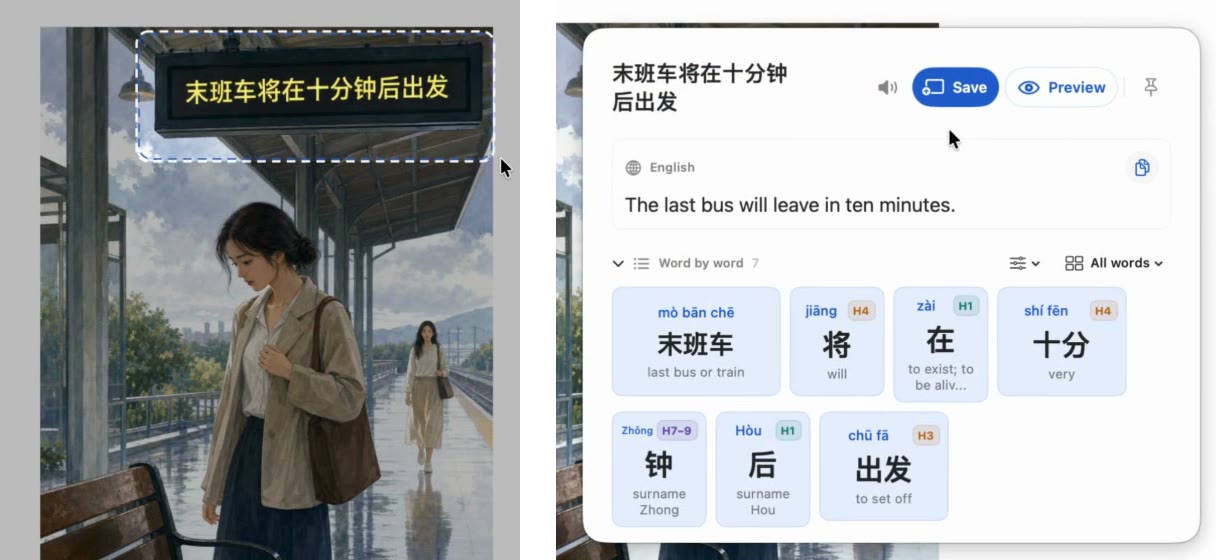
Zhenzhu's Free tier includes unlimited text lookups plus 15 new mined cards and 20 OCR reads per month. Zhenzhu Pro is a $29 one-time purchase covering up to 3 Macs (with an early-supporter discount when active) for unlimited cards, OCR, and Anki automation.
Which Zhongwen alternative should you pick?
- Stay with Zhongwen (or try Zhongzhong) if you read almost exclusively on regular web pages in Chrome or Firefox and do not need Anki sentence mining.
- Pick Frill if you only want a lightweight Safari extension for web reading on Mac and iPhone.
- Pick Yomitan if you live in Chrome/Firefox, love tinkering with custom monolingual dictionaries, and want full control over AnkiConnect templates for free.
- Pick Zhenzhu if you use macOS and want one popup dictionary that works across Safari, Chrome, PDFs, native apps, and screen OCR—with built-in FSRS and Anki mining ready out of the box.
For a broader look at desktop dictionaries and mobile companions, read our guide to the best Chinese reading tools for Mac, or see how Pleco compares on macOS and how screen OCR tools work for learners. If you want to turn your lookups into long-term retention, check our Chinese sentence mining workflow for macOS and Anki.
How this guide was made
Research and drafting were AI-assisted; Chinese vocabulary examples and pinyin (弹窗, 词典, 截屏, 语境, 生词) were verified against CC-CEDICT, and Zhenzhu's features and pricing were checked against the live macOS app and pricing configuration as of November 2026.
Read Chinese on your Mac without friction
Selection lookup, on-device OCR, pinyin tone marks, HSK context, and 1-click Anki export. Try Zhenzhu Free today on macOS 15+.