
Reading raw Japanese manga or playing a visual novel is one of the fastest ways to move past textbook Japanese—until you hit an unknown kanji inside a speech bubble and realize Yomitan cannot hover over an image. On Windows, learners reach for Textractor, LunaTranslator, or ShareX. On macOS, most of those tools either do not run or need fragile Wine setups.
The good news is that modern macOS (especially Apple Silicon) has remarkably accurate on-device Japanese OCR built into the OS. Below are the three setups that actually work cleanly on a Mac in 2026, depending on whether you read downloaded manga archives, PDFs, or live visual novels.
Why manga and visual novels are tricky on Mac
Unlike web novels on Syosetsu or articles on NHK News Web, manga and games render Japanese as flat pixels. Three things make them harder than normal text:
- Vertical text (tategaki): Manga speech bubbles read top-to-bottom, right-to-left. Generic OCR engines often scramble vertical columns into unreadable gibberish.
- Furigana noise: Tiny ruby characters next to kanji can confuse older OCR models, inserting extra kana in the middle of words.
- Live windows: Visual novels (via CrossOver, Parallels, Steam, or Switch capture cards) change dialogue every few seconds. Pre-processing an entire folder ahead of time does not help when text only exists on screen right now.
The 3 setups that actually work on macOS
| Setup | Best for | Vertical text | Popup dictionary | Setup effort |
|---|---|---|---|---|
| Mokuro + Yomitan | Local CBZ/folder manga volumes you read in Chrome | Excellent (Manga OCR trained on manga fonts) | Yes (Yomitan in Chrome) | High (Python CLI + batch preprocessing per volume) |
| macOS Live Text + Look Up | Occasional checks in Preview or Safari images | Good (Apple Vision) | Basic Apple dictionary only (no Anki mining) | Zero (built into macOS) |
| Zhenzhu Snip OCR | Manga apps, Kindle, PDFs, visual novels, games, hardcoded subs | Strong (on-device Apple Vision) | Instant JMdict + deinflection + FSRS / AnkiConnect | Low (native Mac app, 1 hotkey) |
1. Mokuro + Yomitan (best for bulk manga folders)
If you download complete manga volumes as image folders and do not mind running a Python CLI on your Mac, Mokuro is still the gold standard for pure manga reading. It runs manga-ocr across every page in a volume and generates a local HTML file with invisible, selectable text overlays on top of each speech bubble.
- Why learners love it: Once processed, you open the HTML file in Chrome and hover over every bubble with Yomitan just like a webpage.
- Where it slows down: You have to wait for preprocessing on every volume, it only works on local image folders you own (not Kindle for Mac, BookWalker, Netflix, or live games), and installing Python + PyTorch dependencies on macOS takes patience.
2. macOS Live Text (built-in, zero installs)
If you only look up a handful of words per chapter in Preview or Photos, macOS already has Apple's Live Text engine built in. Hover over Japanese text in an image, select it, and press Cmd + Ctrl + D (or three-finger tap) to trigger macOS's built-in Look Up dictionary.
- Pros: Free, offline, zero setup.
- Cons: Live Text does not work inside game windows, video players, or many reader apps. Apple's Look Up popup does not reliably deinflect stacked Japanese verb endings, and it gives you no way to mine sentence cards into Anki.
3. On-device Snip OCR (manga, VNs, PDFs, Switch streams)
When you want one workflow that covers everything on your screen—a visual novel dialogue box, a Kindle manga page, a scanned textbook PDF, or a Switch capture window—a dedicated macOS screen OCR dictionary removes the friction.
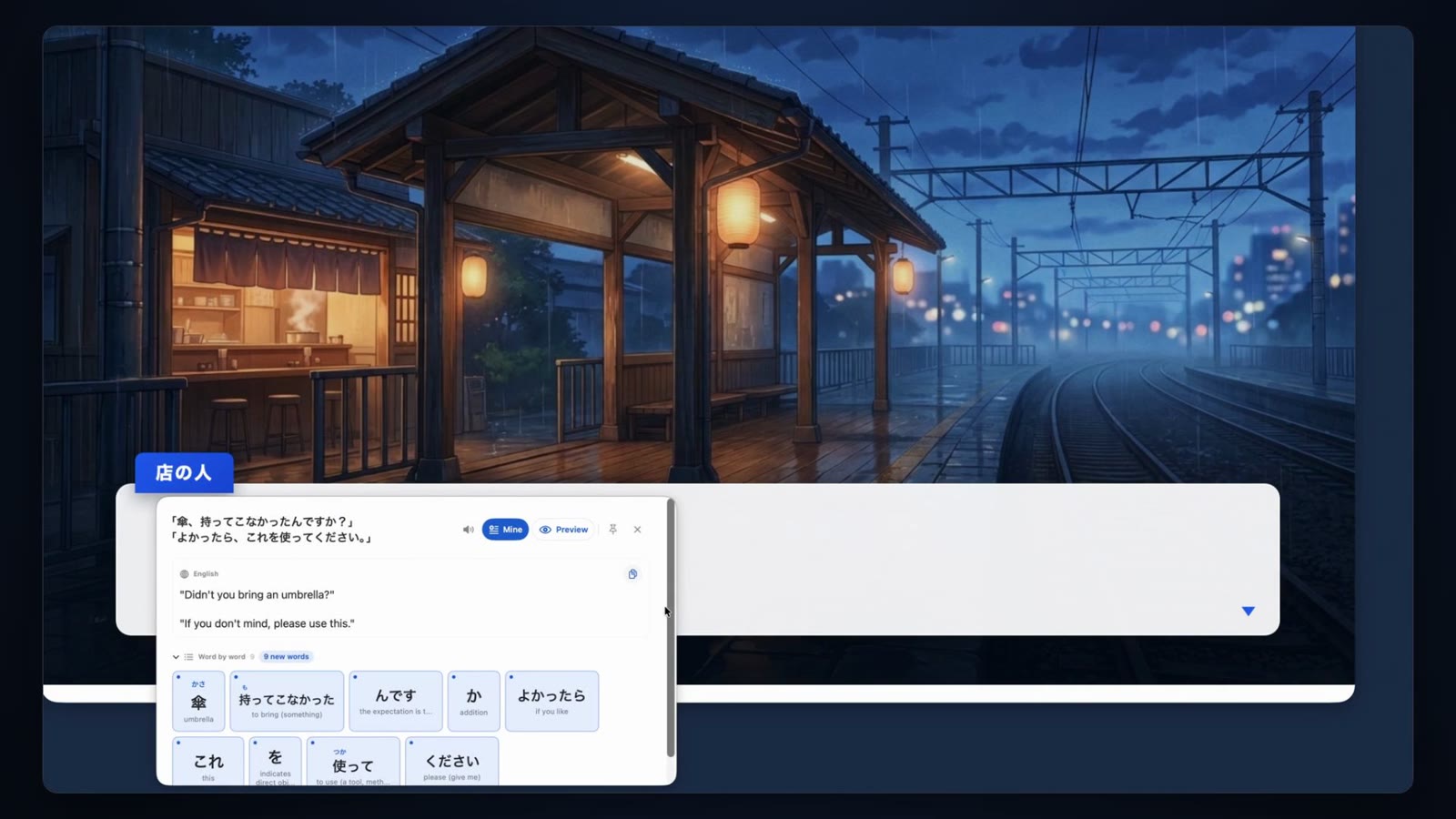
With Zhenzhu, you press a single global shortcut (Cmd + Shift + 2), drag a box over the speech bubble or dialogue box, and release:
- Apple Vision runs locally on your Mac to extract the Japanese text—both horizontal dialogue boxes and vertical manga bubbles—without uploading screenshots to a cloud server.
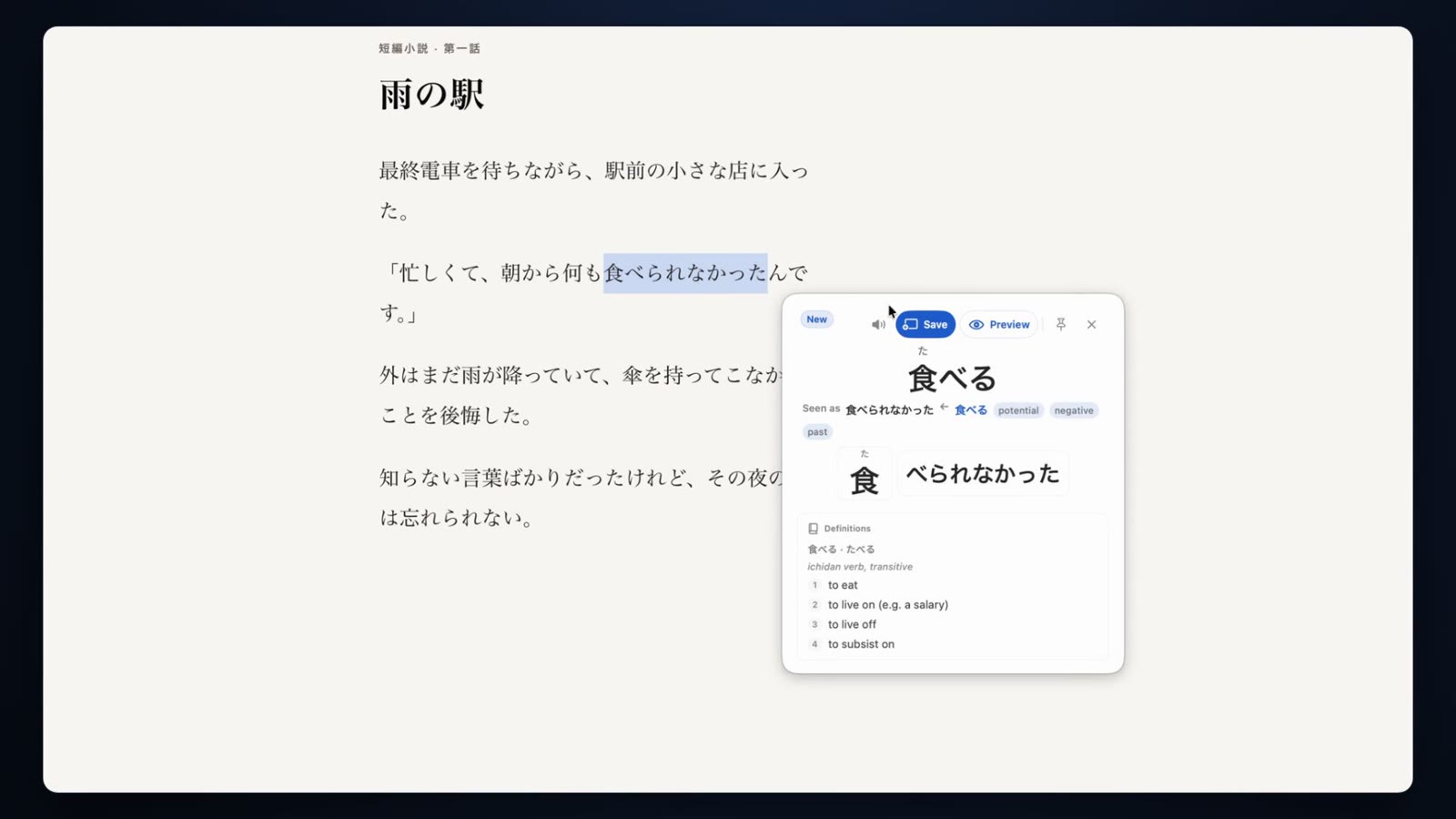
- Zhenzhu segments the sentence into clickable words and runs its offline JMdict + deinflector, so conjugated forms like 食べられなかった resolve straight to 食べる with furigana and English glosses.
- One click saves the sentence card (including the exact line, target word, furigana, meaning, and audio) to built-in FSRS review or your Anki deck via AnkiConnect.
Tips for cleaner vertical Japanese (tategaki) OCR
No matter which Apple Vision tool you use on macOS, three small habits dramatically improve OCR accuracy on manga:
- Crop tightly around one speech bubble: Including a second bubble or background sound effect (SFX) in the same box makes the OCR merge unrelated lines.
- Zoom in on low-resolution scans: Older tankōbon scans with tiny furigana read much cleaner at 125%–150% window zoom.
- Skip stylized hand-drawn SFX: Even the best OCR struggles with brush-stroke sound effects. Focus OCR on dialogue bubbles and narration boxes, where 95% of your useful vocabulary lives.
Turning a manga bubble into an Anki card
Manga and visual novels are ideal for i+1 sentence mining because every sentence comes wrapped in strong visual context—you remember the scene, the character's tone, and the exact moment the word was used.
Keep your mining light so reading stays fun: aim for 5 to 15 mined sentences per session, only mine lines where you already understand the rest of the bubble, and let your lookup tool populate the dictionary form and reading automatically. For the full card-template and AnkiConnect walkthrough, read our Japanese sentence mining for Anki on Mac guide.
How this guide was made
All workflows in this guide were verified on macOS 15+ (Apple Silicon). Zhenzhu's Snip OCR runs on-device via Apple Vision with a bundled offline JMdict dictionary, local FSRS review, and AnkiConnect export (Free tier includes unlimited dictionary lookups plus 20 OCR reads and 15 mined cards/month; Pro is $29 one-time for 3 Macs).
Read Chinese on your Mac without friction
Selection lookup, on-device OCR, pinyin tone marks, HSK context, and 1-click Anki export. Try Zhenzhu Free today on macOS 15+.